SUPPLIER INTEGRATIONS
One endpoint.
We handle the rest.
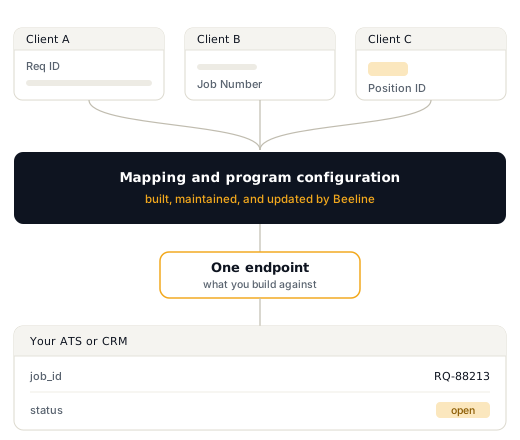
Every client program configures Beeline its own way, with its own fields, its own required values, and its own idea of what to call the same thing. You build to one endpoint. We maintain the mapping to every program behind it, and we keep maintaining it when they change.
One build, every program
No implementation fee
Live in days, not quarters
Why this is hard without us
Clients own their instance.
Nobody configures it for the supplier.
The same job, described differently
Programs adjust fields, add required values, and rework their configuration whenever it suits their business. It is their instance to change, and nobody tells the supplier first.
And it keeps changing
Programs adjust fields, add required values, and rework their configuration whenever it suits their business. It is their instance to change, and nobody tells the supplier first.
And no way in but the front door
Client programs do not publish APIs. Without a supplier-side connection there is no programmatic path in at all, so the work falls to a person logging in and clicking through each portal.
This is why most suppliers still re-key by hand. Not because building is hard, but because until now there was nothing to build against.
The managed approach
We normalize every program.
You connect once.
Being precise about the division of labour, because it is the thing worth understanding before you buy.
01 WHAT BEELINE DOES
Every program's differences, absorbed
We take the fields, required values, status vocabularies, and workflow quirks of every client program and normalize them into one consistent payload behind a single endpoint. When a program changes its configuration, we absorb that too. It never reaches you.
One endpoint, one set of credentials
One payload shape regardless of program count
Program configuration changes handled on our side
New programs added as configuration, not development
02 WHAT YOU DO
Map that one shape into your system
We deliver data ready to consume, but we do not reach into your ATS and map it for you. You connect our payload to your own fields once. The point is that once is all it ever is, because the shape does not change when you add your fourth client, or your fortieth.
Map our payload to your ATS fields, one time
No remapping when you win a new program
Or skip it entirely if your ATS already connects
Two ways to connect
Most suppliers never write a line of code.
Which path you take depends entirely on what your ATS already supports.
FASTest
Your ATS already connects
Several ATS platforms have already built against the Beeline Supplier Network. If yours is one of them, there is nothing for your team to build. You are handing over a key, not starting a project.
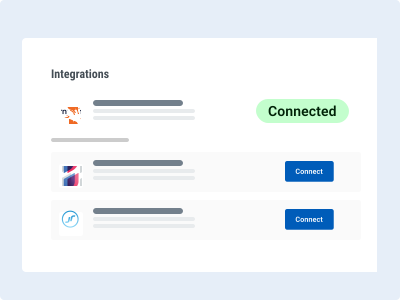
1. Link your Beeline client programs
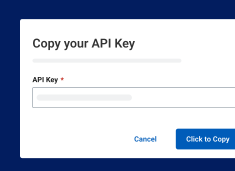
2. Generate your API key
3. Give the key to your ATS provider and they switch it on
Typically live the same week. No developer needed.
MOST CONTROL
Build to the endpoint directly
If your ATS has no connector, or you would rather own the integration, you build against one documented endpoint. The hard part, reconciling how every program describes the same thing, is already done.
1. Link your client programs and generate credentials.
2. Build once against the documented endpoints
3. Map the payloads into your own fields, one time only
Build once, no matter how many programs you serve.
THE APIS
Three live today. Two more in build.
Everything below runs through the same endpoint and the same credentials. Whenever something new is ready, your team can use it right away.
Job Request API
LIVE
New requirements flow into your recruiting system without manual entry. When jobs change, go on hold, fill, or close, their status stays synchronized.
Stops your team spending an afternoon sourcing against a req that closed on Tuesday.
Candidate API
LIVE
Send candidates directly into Beeline, then keep your recruiters informed as candidates progress through review, shortlisting, interviewing, and selection.
Removes the double-entry that makes recruiters slow and makes data wrong.
Timesheet API
LIVE
You pay your workers whether or not you have been paid yet. Get notified the moment a timesheet is created and follow it through approval, so you know invoices are on their way without running a report to find out.
You pay your workers whether or not you have been paid. Timesheets are how invoices get generated, so knowing they were entered on time protects your cash position.
Invoice API
UP NEXT
Invoice visibility and status through the same connection. Prioritized and in build.
Assignment API
UP NEXT
Notification of pending extensions and the ability to accept new assignment offers without leaving your system. Prioritized and in build.
PRICING
Integrations are included in all team plans
The APIs come with membership rather than as an add-on, because the whole point is that connecting should not be a separate purchase decision every time you win a client. No implementation fee and no professional services engagement to get started.
Endpoints
One, all programs
Job synchronization
Unlimited
Implementation fee
None
Typical time to live
Days
Adding a new program
Configuration only
FAQ
What you need to know about Supplier Integrations
How does the API integration work?
Beeline's API lets you securely integrate your ATS directly with your Beeline supplier account. This automates job retrieval and candidate submittal — no manual data entry, no missed postings. View documentation at bsn.beeline.com/supplierdocumentation.
Do I need an integration per program?
No, and this is the point of the product. You build once against one endpoint. Every Beeline program you serve is reachable through it, and adding another is a configuration change on our side rather than a build on yours.
Is this scraping or screen automation?
No. These are documented, supported APIs from Beeline into Beeline. Nothing depends on a page layout staying still, which is exactly why the brittle scraper you may be running today keeps breaking.
Are there any fees to integrate with the APIs?
No fee and no required professional services engagement. Most suppliers are live in days. The work that used to be a project is now a setup step.
How do service credits work with APIs?
Service credits measure usage of data services like APIs. Each plan includes a set number. You can upgrade or purchase additional credits as your usage grows.
The Job Posting API does not use service credits. Think of this as a way of getting every job into your ATS as part of your plan cost.
To see more information regarding Service Credits and Usage, please visit our Documentation Portal.
Do I have to use a supported ATS?
No. Where a connector already exists it is the fastest path, since you only generate an API key and hand it over. If your ATS has no connector, you build against the same documented endpoint yourself.
Do you map the data into my ATS for me?
We normalize across programs, not into your system. You get one consistent payload no matter how many programs you serve, and you map that payload to your own fields once. What you never do is repeat that work per client, or redo it when a program changes its configuration.
Can multiple operating companies share one account?
Yes, with the right setup. Separate accounts are recommended if each operating company has its own ATS or you want clean data separation. One shared account works if all operating companies use the same ATS.